Retrieval-Augmented Generation (RAG) is one of the most practical applications of LLMs today. It allows us to chat with our own data like documents, logs, notes without retraining a model.
In this post, I want to share my experience building a RAG application from scratch. Most of the code is generated using vide-coding, allowing us to focus on the logic and experience rather than syntax. In this post, I’ll walk you through how I built a robust RAG application using Streamlit, LangChain, and OpenAI (GPT-4o) that doesn’t just answer questions but also cites its sources.
The Architecture
The application follows a classic RAG pipeline but adds a few key enhancements for production-readiness:
- Ingestion: Upload multiple PDFs -> Split into chunks -> Embed using OpenAI.
- Storage: Store embeddings in a local Chroma vector database for persistence.
- Retrieval: Fetch relevant chunks based on user queries.
- Generation: Feed chunks + query to GPT-4o to generate an answer.
- History Awareness: Rephrase follow-up questions to be standalone (crucial for chat interfaces).
- Citations: Return the specific source document and page number for every answer
Key Technical Decisions
1. Persistence is Key
Most tutorials show in-memory vector stores that vanish when you restart the script. I chose ChromaDB with a persistent directory (./chroma_db). This means you can upload a massive 500-page manual once, restart your app, and it’s still there ready to be queried.
2. Handling Conversation History
A common failure mode in simple RAG apps:
User: “Who is the CEO of Acme Corp?” Bot: “John Doe.” User: “How old is he?” Bot: Confused because “he” lacks context.
To fix this, I implemented a History-Aware Retriever using LangChain. Before searching for documents, the app uses a lightweight LLM call to rewrite “How old is he?” into “How old is John Doe, the CEO of Acme Corp?”. This rewritten query is what actually hits the vector database.
contextualize_q_system_prompt = ( "Given a chat history and the latest user question " "which might reference context in the chat history, " "formulate a standalone question...")3. Citations & Trust
Trust is built on verification. The app doesn’t just say “The revenue was $5M.” It says:
“The revenue was $5M.” Source: Q3_Report.pdf (Page 12)
This is achieved by preserving the metadata (filename and page number) throughout the LangChain pipeline and surfacing it in the Streamlit UI using an st.expander.
4. Application State with SQLite
Streamlit’s session_state is great but ephemeral. If the user refreshes the browser, the chat is gone. To solve this, I added a transparent SQLite backend (db_manager.py).
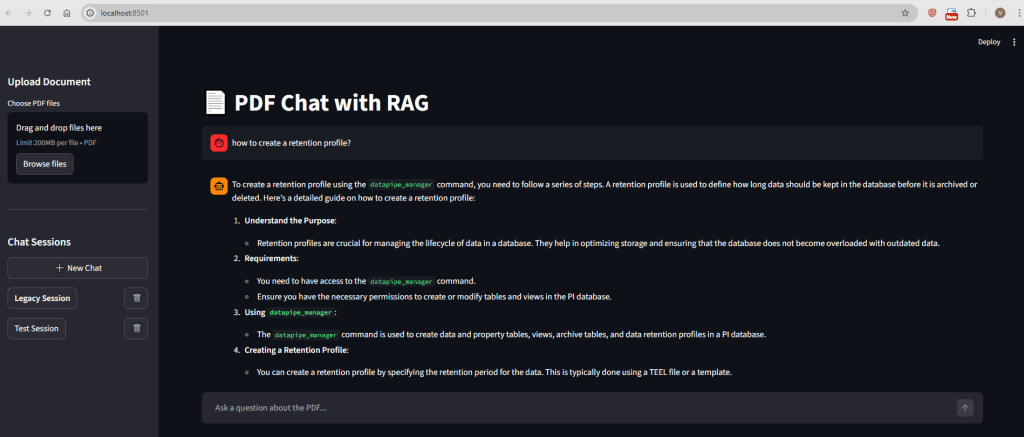
- Sessions: Users can create named sessions (e.g., “Legal Docs”, “Project X Specs”).
- Messages: Every interaction is saved to disk immediately.
The Stack
- Frontend: Streamlit (Pure Python UI)
- Orchestration: LangChain
- Model: OpenAI
gpt-4o(High accuracy) - Embeddings:
text-embedding-3-small(Cost-effective) - Database: SQLite + ChromaDB
Screenshot of the UI:
Conclusion
Building a RAG app is easy; building a good one requires handling edge cases like follow-up questions, persistence, and citations. This project serves as foundation for anyone looking to build a “Chat with your Data” application that is more than just a toy demo.
Check out the full code in the repository!
 Telemetry Compass
Leave a comment